Skip to content

News

Release notes and announcements for CsoundQt.

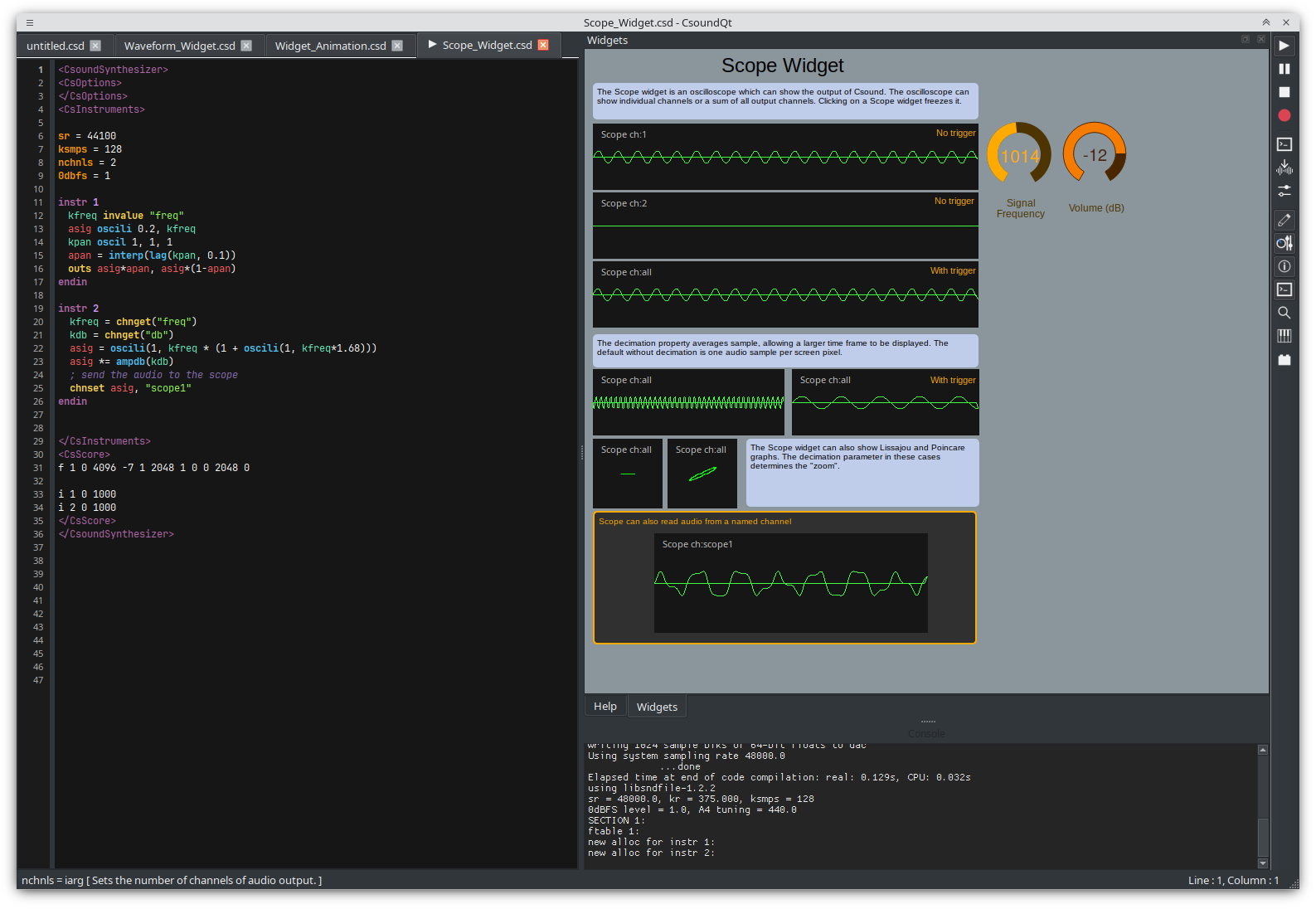
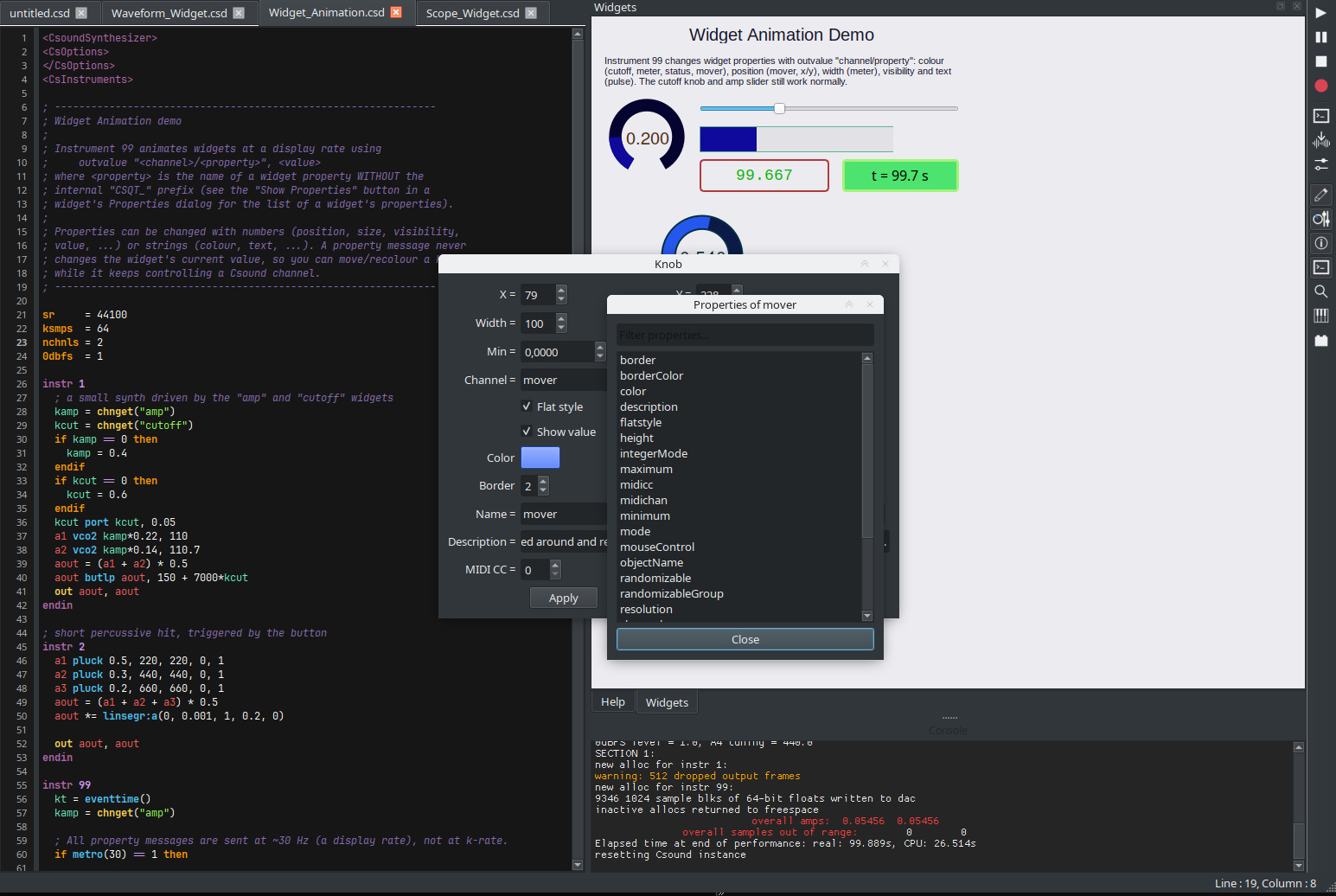
Version 7.0.0-beta Now Available!

CsoundQt 7.0.0-beta1 represents a major milestone in the evolution of CsoundQt. This release introduces significant modernization efforts, full compatibility with Csound 7, and a complete migration to Qt 6, providing a more robust and future-ready foundation for the IDE.

The source and upcoming binaries can be downloaded from: https://github.com/CsoundQt/CsoundQt/releases/tag/v7.0.0-beta1

Demo:

See release notes here: https://github.com/CsoundQt/CsoundQt/blob/csoundqt7/release_notes/Release%20notes%20v7.0.0-beta.md

Version 1.1.1 Released

After a long break and lots of development a new release of CsoundQt is out!

https://github.com/CsoundQt/CsoundQt/releases/tag/v1.1.1

Version 1.1.1 is a major release, it follows 0.9.8 (due several reasons version numbers in between are skipped).

Please note that under the assets there are also packages for MacOS, Windows and Linux including Csound - so there is no need to install Csound separately.

New in version 1.1.1:

  • initial support for risset, detects risset being installed and adds syntax highlighting, completion and documentation for any installed plugins and opcodes
  • Support for dark themes. If your os / desktop environment uses a dark theme this will be honoured within CsoundQt, keeping things like the help dock or menus usable.
  • New dark icon theme, needed when using a dark theme.
  • Proper support for momentary/toggle MIDI buttons
  • Support for limiter (enabled by default, see Configure->Advanced). Requires Csound>=6.16.
  • Tab icons for Play/Paused.
  • Tabs now movable.
  • Convert MIDI bindings of widgets to independent instrument (for exporting out from CsoundQt) Edit->Insert MidiControlInstrument
  • Autocomplete menu revamped
    • Autocomplete performance is much better
    • Added a configurable delay so that the menu does not interfere with fast typing
    • Completion added for external plugins and command line options.

Examples

  • Examples has new structure. The menu is populated from folder src/Examples and the main examples are not compiled into the CsoundQt binary any more. All examples can share one common pool of resources (src/Examples/SourceMaterials/)
  • Spectrum Analyzer: added a note to explain how the detected peak can be made audible
  • Many improvements by several examples (Joachim Heintz).

Fixes/optimizations

  • Table plot widget: much better performance. Threading issues fixed. This is now the recommended way to display the contents of a table.
  • Syntax highlighting has been heavily optimized. Very big files now load in a fraction of the time
  • Many widget examples adapted to not assume a light background
  • Inspector was optimized and now parses a csd file ~10x faster
  • Parenthesis highlighting now works more reliably across multiple lines
  • Syntax highlighting for score optional and off by default (useful when opening files with very long scores)
  • Put back Utilities to taskbar
  • Fixed current dir problem (like issue with system_i)
  • More convenient MIDI Learn for widgets.

Other issues

  • fixed AudioMidiTest in windows
  • fixed wrong characters in Help Window on Windows
  • fixed font issues in the console (each platform now has a default console font part of the system fonts)
  • fixed crash on opening deleted files
  • fixed messed characters in help panel on Windows
  • fixed hover text being too small in certain cases
  • autocomplete on words in the same document optimized to not update every keystroke
  • autocomplete menu code simplified
  • autocomplete menu now somewhat tidier, switched to monospaced font to have arguments and rate line up across items
  • changed graphs widget color when displaying tables to yellow for better contrast
  • fixed bug of widgets changing position after MidiLearn dialog.
  • remove play icon from tab when stopped in the end of score
  • set default input to none on MacOS if portaudio is being used.

Internal changes

  • Ported most of regexes to QRegularExpression
  • Compatibility corrections to build with older Qt5 versions
  • Dropped support for Qt4 and Csound5
  • RtMidi now a submodule, should always be available
  • Hopefully fixed document always modified problem
  • disable highlighting within data tags of a csd (for example CsFileB)
  • Use showFullScreen only on Windows, others showMaximized.

Eduardo Moguillansky, Tarmo Johannes

Version 0.9.8.1 Released

Version 0.9.8 is a major release, with multiple changes. Author of most of the improvements is Edoardo Mogillansky. Greatest thanks!

There is an update with some fixes, v0.9.8.1, see the list of fixes below, that is meant for the final use.

The source and binaries can be downloaded from: https://github.com/CsoundQt/CsoundQt/releases/tag/v0.9.8.1.

This version of CsoundQt works with csound 6.14 or higher

New in version 0.9.8:

  • New icon theme based on KDE's "breeze"
  • New color themes (for text, background and syntax highlighting): classic, light, dark.
  • New flat style and features for the knob widget.
  • New "Table Plot" widget allows to efficiently plot tables in real time.
  • Graph widget (spectrum, signal display) has been highly optimized, drawing is between 10x and 20x faster
  • Graph widget fixed for the use together with display opcode. Many display instances can be used simultaneously for one or multiple widgets without any loss in performance.
  • Graph widget for tables optimized for big tables and soundfiles, detects the actual size of the graph and does not draw superfluous points
  • Spectrogram widget now reacts to different sample rates, gained a better grid and zoom. It can be customized to show/hide grid, scrollbars, menu, etc.
  • Spectrogram widget can control the zoom with keyboard shortcuts (+, -). Also scrollbars can be hidden (user can scroll with scrollwheel/arrow keys).
  • Spectrum graph: a graph can bow be frozen; clicking on a peak will show the peaks frequency with resolution independent of the fft size of the corresponding dispfft
  • New icon / new splashscreen
  • Meter / Controller widget gained many options to control its aspect (border, line width, background, etc)
  • New action to test the audio setup
  • Text labels allow to set a vertical alignment
  • New settings dialogs, allows to use the current system sample rate and set the number of channels without the need to modify the .csd
  • Help panel received a more streamlined look
  • More streamlined toolbar, removed toolbar buttons which are not commonly used (these can still be reached from the menus), icon size can be set in the preferences, toolbar can be locked
  • Many widgets gained the possibility to set their value by double-clicking (knob, scroll number)
  • Now it is possible to move the widgets with the keyboard in edit mode. The arrow keys move the widgets within a grid of 5 pixels (with the alt key widgets are nudged by 1 pixel).
  • More nuanced syntax highlighting
  • Syntax highlighting for user defined opcodes. The work for this lays the ground for features like autocomplete and code hints for UDOs.
  • Button widget can set the size of the font
  • Checkbox can be resized if the platform allows this (works on linux and windows, macOS uses native checkboxes which are fixed in size)
  • Added a setting to control the update rate of the gui.
  • New "Spectrum Analyzer" utility example
  • Initial support for color schemes, allowing csoundqt to use a dark theme matching the os (not yet available in this release).
  • New action "goto line"

Fixes

  • Race condition fixed which would cause CsoundQt to crash when started/stopped in very fast succession
  • Locking issues fixed which prevented CsoundQt to stop properly when a graph widget was used.
  • Saving issues where fixed. New option to prevent CsoundQt from asking if user wants to save a temporary file before playing.
  • in macOS startup delay has been somewhat reduced.
  • Wrong rendering for the Meter / Controller widget fixed is macOS
  • Better font defaults for the different platforms
  • CTRL-F now searches in manual if help dock is focused.
  • Search bar is made visible and focused when clicked on search icon in the help widget
  • Fixed a bug where activating the widgets panel when the widgets are in a separate window would result in an empty widgets panel or, worse, a crash.
  • Fixed selection and dragging of widgets. Now responds to usual keyboard modifiers, such as CTRL toggling selection, and shift adding an item to a selection, etc.
  • Changing rt audio module now clears the device selection
  • Fixes last used dir in linux falling back to /tmp
  • macOS: fix to background color in widgets panel
  • Better options for selecting an audio device if jack is selected as module (now the default does not connect to other ports other than the system)
  • In the config dialog, if jack is not running then this is shown in the menu and jack can't be selected
  • scope now has much lower latency
  • native toolbar in macOS
  • Less intrusive line numbers, adjust colors to the color theme
  • Each platform has own defaults for fonts, sizes, etc., resulting in a better first time experience
  • Lots of fixes in syntax highlighting
  • Audio device is reset to default whenever the audio backend is modified
  • Full-screen issues have been mostly resolved. Window state is remembered.
  • Graph widget would cause a crash when adding a new table if a spectrum display was selected. This was fixed.
  • Atsa defaults were corrected
  • Latched button acting wrong on event with negative duration fixed
  • Application paths were fixed for macOS
  • Toolbar rendering problems in mac were fixed, reverting back from using mac's unified toolbar.


Fixes in 0.9.8.1

  • toolbar in mac now renders correctly, better padding
  • virtual keyboard back in toolbar
  • table plot not longer upside down
  • graph widget changes tables as advertised when given a negative number
  • macOS: many keyboard shortcuts now work out of the box

Version 0.9.5 Released

The source code and binaries can be downloaded from: https://github.com/CsoundQt/CsoundQt/releases/tag/0.9.5

Version 0.9.5 fixes a number of bugs - especially the nasty copy-paste problem on Windows is now fixed - and adds new way to handle the work with panels and tabs.

See demo:

And release notes:

https://github.com/CsoundQt/CsoundQt/blob/master/release_notes/Release%20notes%200.9.5.md

Version 0.9.4 Released

Glad about the new release!

The source code and binaries can be downloaded from: https://github.com/CsoundQt/CsoundQt/releases/tag/0.9.4

Version 0.9.4 fixes a number of bugs and adds some new convenience features. The author of most of the commits is Tarmo Johannes, the full-screen option of different panels has been written by Michael Gogins.

See demo:

New features

  • Options are saved in runtime (on applying configuration changes in Confifuration dialog; opening or creating new documents), not only on exit - so the settings are not lost if CsoundQt crashes.

  • It is possible to set different panels to full screen (editor, manual, widgets and html panels) especially useful for smaller screens. Default shortcuts are:

  • Crtl-Alt-0 (Alt-Cmd-0 for Mac): editor
  • Crtl-Alt-1: help
  • Ctrl-Alt-2: widgets
  • Crtl-Alt-3: html panel

To activate the new shortcuts, you must reset the shorcuts in Edit->Set Keyboard Shortcuts->Restore Defaults or set them in the shortcuts editor by your own preference.

  • Handling Live Event Sheet windows is more flexible: you can open the LE controller, create or open necessary LE sheets, then close LE conroller and keep working with the LE windows as you need.

  • In Configuration->Editor there is now an option to set editor's background colour. The same colour is used also for Inspector, Scratchpad and Python Console. The font-color cannot be changed (for now) due to fixed higlighting colors of different keywords. The background color of Console panel can be set from Configure->General.

  • "Add chn_k declaration" in widgets' cotext menu - now it easy to add the chn_k lines for widget's channel to be used with chnget/chnset opcode.

  • Added support for jack midi as Csound module (listing jack clients requires Csound 6.09)

  • Experimental support for choosing midi module for internal RT-midi (Linux only): add line

    Run\rtMidiApi=UNIX_JACK

    or

    Run\rtMidiApi=LINUX_ALSA

    to configuration file ($HOME/.config/csound/qutecsound.conf).

Fixes

  • MIDI interfaces for CsoundQt internal MIDI are stored now by name, not port number - this fixes error of opening wrong ports on nexts restart of the program when MIDI setting has changed. Also if the order of the MIDI devices has changed, the correct dvice is used for input/output.

  • Fixed non-visible font color of widget channels on widget panel in editing mode.

  • Fixed bug of black console background color on OSX 10.12

  • Toolbar positions are saved and restored correctly

  • Support for building with PuthonQt3.1 (OSX)

  • Better switching between internal RT-midi and Csound midi modules.

  • Fixed crash on using more than 255 tables.

  • Latched event button with negative duration and named instrument (like 'i "sound" 0 -1') stops the sound correctly on release (requires Csound 6.09 to work).

Version 0.9.3 Released

The source code and binaries can be downloaded from: https://github.com/CsoundQt/CsoundQt/releases/tag/0.9.3

Version 0.9.3 introduces some new features, fixes a number of bugs and although not in the final release, the new qt based html5 support is available for testing from branch qthtml. For instructions how to use the branch see https://github.com/CsoundQt/CsoundQt/wiki/Checking-out-develop,-qthtml-or-other-branch

New features

  • Table editor for GEN07 tables
  • Improved and extended Insert/Update CabbageText - conversion of CsoundQt widgets into < Cabbage> definition.
  • Experimental html5 support based on Qt libraries - no CEF dependency any more, available also on OSX and Linux.

Fixes

  • Fixed wrong widgets behaviour if MIDI channel is 0 and widget's CC and Channel are unset.

  • Support for building both with older and newer Csound source code (CS_APIVERSION 4)

  • Numerous fixes in examples, correction of spelling errors

  • Better colour for word completion box

Version 0.9.2.2 Released

The source code can be downloaded from: https://github.com/CsoundQt/CsoundQt/releases/tag/0.9.2.2

Version 0.9.2.2 is a bug-fix release.

Fixes

  • Fixed serious error on Linux that made CsoundQt crash when STK-opcode plugin was present but RAWWAVE_PATH was not set (typical when Csound was installed with package manager).

  • Work and improvements on html5 support (Michael Gogins)

  • Fixed build failure with Csound debugger enabled (Felipe Sateler)

  • Work on different examples + some new examples (Joachim Heintz)

  • Fixed Configuration dialog resizing so it cannot be out of screen any more

  • Fixed crash on closing first tabs and using midi (midi-listeners' corrected removal, issue #211)

  • Corrected auto-completion of functions (like int, ampdb etc issue #214)

  • Removed (most of) lines causing "Slot not found" messages in command line output.

Miscellaneous

  • Thorough documentation on CsoundQt web-page http://csoundqt.github.io/pages/documentation.html (by Joachim Heintz)

  • Link to the documentation in Help menu (shortcut F1)